What Is a Hobby CNC Machine and How Does It Work?

A hobby cnc machine brings computer-controlled cutting into a garage, classroom, or small workshop. It can carve wood, shape plastics, engrave signs, and machine soft metals. Unlike a hand tool, it follows programmed movements with repeatable precision. That does not mean perfect results every time.

The process begins with a digital design. CAD software defines the part, while CAM software converts the design into toolpaths and G-code. The controller reads that code and directs motors along the X, Y, and Z axes. A spindle then rotates the cutting tool at a selected speed. The tool removes material layer by layer. Small details matter. A loose clamp, blunt cutter, or incorrect feed rate can ruin an otherwise accurate job.

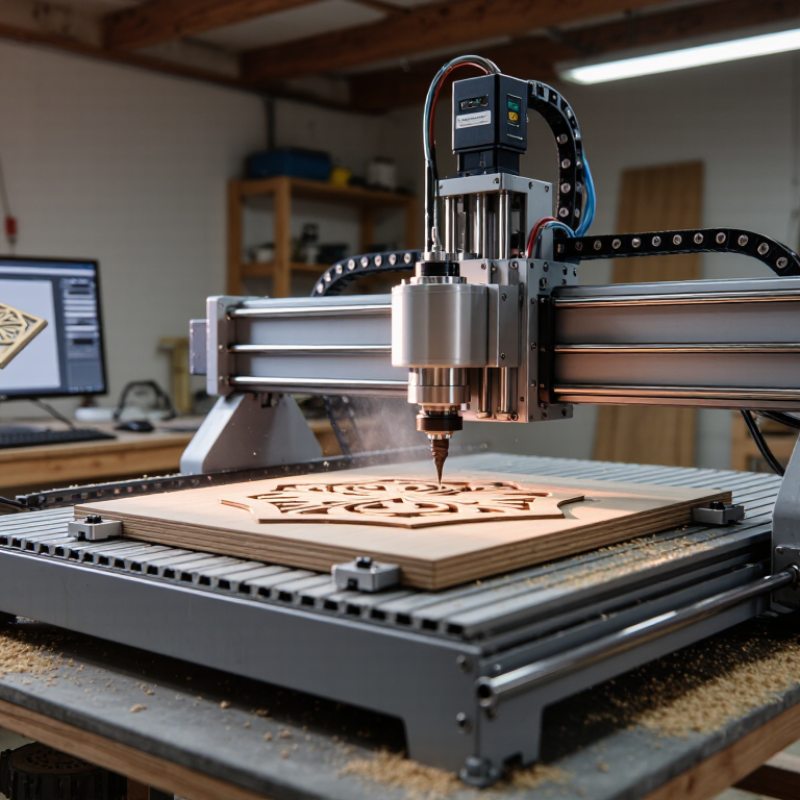
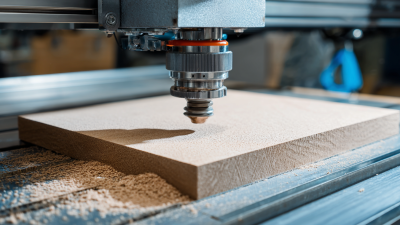
This guide explains what a hobby cnc machine is and how its main systems work together. You will see how the frame, stepper motors, controller, spindle, software, and workholding affect performance. Practical examples will make the process easier to picture, such as a router cutting a wooden panel while chips collect around the table. Safety remains essential, including eye protection, secure material, dust control, and emergency-stop access. Beginners often expect a desktop machine to work immediately, but setup and testing require patience. Even experienced users can misjudge material behavior. Understanding those limits helps you choose realistic projects, reduce waste, and improve results through careful measurement and adjustment.

What Is a Hobby CNC Machine and How Does It Work?

What Is a Hobby CNC Machine?

What Is a Hobby CNC Machine and How Does It Work?
What Is a Hobby CNC Machine?

A hobby CNC machine is a compact computer-controlled tool for cutting, drilling, or carving material. CNC means computer numerical control. Instead of guiding a cutter by hand, the operator prepares a digital design and converts it into G-code. The controller then moves the cutting tool along the X, Y, and Z axes. Small machines often use a rotating spindle, stepper motors, linear rails, and a clamping bed.

It is not a miniature industrial machining center. Most hobby models handle wood, plastic, foam, and softer metals, depending on rigidity and spindle power. A typical workflow begins with a CAD drawing, followed by CAM toolpath planning. The machine then removes material layer by layer. Small details matter. Loose clamps can ruin accurate work within seconds.

Grand View Research estimated the global CNC machine market at about 88.6 billion dollars in 2023, showing the wider importance of computer-controlled manufacturing. Deloitte’s 2024 Smart Manufacturing survey also reported that 86% of manufacturers expect smart manufacturing to support competitiveness within five years. These figures describe industry, not hobby equipment, but they explain the technology’s growing accessibility. In practical use, beginners often focus too much on cutting speed. I made that mistake myself. Tool choice, feed rate, dust control, and workholding usually matter more. A hobby CNC machine rewards patience, yet it still leaves room for rough edges and incorrect assumptions.

Core Components and Their Functions

What Is a Hobby CNC Machine and How Does It Work?

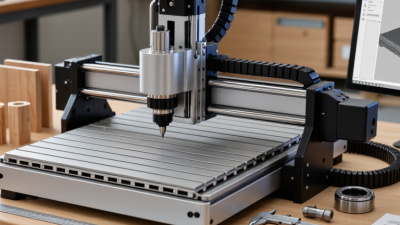
A hobby CNC machine is a compact, computer-controlled tool for cutting, carving, or drilling material. It follows digital toolpaths created in design and manufacturing software. The frame supports every movement, so rigidity directly affects accuracy. Even slight flex can leave ridges along a cut edge. The spoilboard or worktable holds the material flat during machining. Clamps must secure the stock without blocking the cutter. In practical use, careful setup often matters more than maximum machine speed.

Core Components and Their Functions

The motion system uses stepper motors, drive screws, and linear rails. Motors convert electrical signals into controlled movement along the X, Y, and Z axes. Rails guide that movement and reduce unwanted play. The spindle rotates a cutting tool at adjustable speeds. Collets hold the tool, while cutters remove material in measured passes. A controller interprets coordinates and sends commands to each motor. Limit switches help define machine boundaries and improve repeatability. Dust collection protects visibility and reduces debris near moving parts. No setup is perfect. I still recheck tool height, clamping pressure, and axis alignment before cutting.

Tips: Start with shallow passes. Measure the material twice. Keep cables away from moving parts, and never ignore unusual vibration. A slower feed can produce a cleaner surface, but excessive caution may waste time and overheat the cutter. Evaluate the result, then adjust one setting at a time.

How a Hobby CNC Machine Converts Designs into Parts

What Is a Hobby CNC Machine and How Does It Work?

How a Hobby CNC Machine Converts Designs into Parts

A hobby CNC machine turns a digital design into a physical part through controlled movement. The process starts with a CAD drawing containing exact dimensions. The design then enters CAM software, which plans cutting paths around the material. These paths become numerical instructions called G-code. The controller reads each line and sends signals to the machine’s motors.

The cutter follows. Motors move along the X, Y, and Z axes while the spindle rotates at a selected speed. Cutting depth, feed rate, and tool diameter strongly affect the result. A rigid workholding setup keeps the stock from shifting during machining. Even slight movement can create ridges, incorrect holes, or damaged edges. I have found that careful measuring often matters more than faster cutting.

Before machining, an operator checks the tool position and sets the work origin. This point tells the machine where the design begins on the material. A test pass above the surface can reveal coordinate mistakes safely. Small errors matter. Dust removal, eye protection, and proper tool inspection also support reliable work. Hobby machines can produce accurate parts, but they are not automatically precise. Material grain, tool wear, vibration, and imperfect calibration all require attention. Sometimes the toolpath looks correct on screen but performs poorly in practice. Adjustments are part of the craft.

Materials and Projects Suitable for Hobby CNC Machining

A hobby CNC machine removes material according to a digital toolpath. For suitable projects, material choice matters as much as machine accuracy. Softwood, plywood, and MDF are forgiving options for beginners. They work well for signs, shallow reliefs, storage trays, and simple brackets. Secure the sheet firmly. Loose material can ruin a clean cut.

Hardwood produces attractive furniture parts, boxes, and decorative panels, but it needs sharp cutters and steady feeds. Acrylic is useful for signs, templates, and small display pieces. It can melt when cutting speeds, feed rates, or chip removal are poorly balanced. Foam and machining wax are easier choices for prototypes, molds, and scale models. They allow quick design changes with less waste.

Thin aluminum is possible on a rigid hobby machine, although it demands careful setup, lubrication practices, and conservative cutting settings. I would not treat it like wood. Dust collection and eye protection remain essential, especially with MDF and fine hardwood dust. My early cuts were not perfect. I sometimes selected an aggressive depth and damaged the edge. That mistake taught me to test a small corner first, inspect the toolpath, and measure the actual stock thickness. Small projects reward patience. A useful project should be safe, measurable, and realistic for the machine’s working area.

What Is a Hobby CNC Machine and How Does It Work?

A hobby CNC machine uses computer-controlled motion to guide cutting tools along programmed paths. The chart compares the approximate density of common materials suitable for hobby CNC projects, which helps estimate workpiece weight and cutting behavior.

Lower-density materials such as MDF, HDPE, and acrylic are generally easier to handle on small machines. Aluminum and brass are denser metals that typically require more rigid machines, appropriate tooling, and slower cutting parameters.

Operating Limits, Safety Practices, and Maintenance Needs

A hobby CNC machine removes material through computer-controlled cutting. Its operating limits are practical, not theoretical. The work envelope restricts part size, while spindle power limits cutting depth and feed rate. Aluminum, hardwood, and plastics need different speeds, cutters, and chip-clearance methods. Excessive load can cause vibration, broken tools, or inaccurate edges. Expect repeatability, not unlimited precision. Home workshops often lack industrial dust extraction and rigid foundations, which can affect results.

Safety deserves more attention than speed. The 2023 U.S. Bureau of Labor Statistics report recorded about 2.6 million nonfatal private-industry injuries and illnesses. That figure covers many workplaces, but it shows why routine controls matter. Enclose the cutting area where possible, secure the workpiece, and keep hands away from moving tools. Wear eye protection, control airborne dust, and avoid loose clothing. Never leave an active job unattended. I have found that a clean setup still needs a second inspection. Small oversights become expensive quickly.

Tips: Check tool sharpness before every job. Measure material thickness twice. Set conservative feeds during unfamiliar cuts. Vacuum chips only after motion stops. Inspect belts, rails, fasteners, and cables weekly. Lubricate moving parts according to the service manual, and record unusual noise or backlash. The U.S. Occupational Safety and Health Administration recommends machine guarding and energy-control practices; adapt those principles before maintenance, even on small equipment. Starter checklists help, but they cannot replace judgment.

What Is a Hobby CNC Machine and How Does It Work? - Operating Limits, Safety Practices, and Maintenance Needs

Data Dimension What It Means Typical Hobby-Class Information Operating, Safety, or Maintenance Considerations
Basic Definition A computer-controlled machine that moves a cutting tool along programmed paths to remove material. Most hobby machines are compact 3-axis routers or mills using X, Y, and Z movement. The machine follows toolpaths generated from CAD and CAM software; it does not automatically guarantee correct workholding, tooling, or cutting parameters.
Main Machine Components The structural and control parts that create, transmit, and monitor motion. Frame, gantry, linear guides, lead screws or ball screws, stepper motors, controller, spindle or router, spoilboard, and limit or homing switches. Loose fasteners, contaminated guides, and poorly aligned motion components can cause vibration, dimensional errors, or missed steps.
How Motion Is Controlled Digital commands are converted into motor movements and spindle-control signals. A controller interprets G-code, coordinates axis movement, and may control spindle speed, coolant, probing, or auxiliary outputs. The operator should verify the coordinate system, work zero, tool length, and program units before cutting.
Common Work Envelope The maximum area in which the cutting tool can travel. Compact hobby machines often provide work areas from approximately 300 × 300 mm to 600 × 600 mm, with larger models also available. The usable area is smaller than the overall machine footprint and may be reduced by clamps, fixtures, dust collection, or tool clearance requirements.
Typical Materials Materials that can be cut depend on machine rigidity, spindle power, tooling, workholding, and cutting parameters. Wood, plywood, plastics, foam, circuit-board laminates, and non-ferrous metals such as aluminum are common. Some rigid machines can perform light cuts in mild steel. Material dust, chips, heat, and fumes differ significantly. Avoid unknown plastics, brittle materials, and any material that may release hazardous dust or gases without suitable controls.
Cutting Accuracy Accuracy describes how closely the machine reaches programmed dimensions; repeatability describes how consistently it returns to the same position. Actual results vary widely. Hobby machines may achieve useful woodworking tolerances, but accuracy depends on calibration, rigidity, backlash, tool deflection, temperature, and setup. Do not treat advertised resolution as cutting accuracy. Check dimensions with appropriate measuring tools and run a test cut before production work.
Spindle or Router Speed Rotational speed affects chip formation, surface finish, heat, and tool life. Small routers commonly operate at high rotational speeds, while CNC spindles may offer electronically controlled speed ranges suited to different tools and materials. Use the tool manufacturer's recommended speed and feed range. Excessive speed with insufficient feed can create heat, melting, burning, or premature tool wear.
Feed Rate and Depth of Cut Feed rate is tool movement speed; depth of cut is the material thickness removed in one pass. Conservative values are generally required because hobby machines have less rigidity and power than industrial equipment. Reduce cutting depth, feed rate, or tool diameter if the machine chatters, stalls, deflects, overheats, or produces poor surface finish.
Workholding Workholding keeps the material fixed and prevents movement during cutting. Common methods include clamps, screws through sacrificial areas, vacuum fixtures, double-sided tape, and dedicated jigs. The cutter must never contact clamps or fasteners. Confirm that the workpiece is supported across the cutting area and cannot lift or rotate.
Essential Safety Equipment Protective measures reduce the risk from rotating tools, flying fragments, dust, noise, and unexpected machine movement. Use eye protection, hearing protection where needed, suitable respiratory protection for hazardous dust, effective dust extraction, and a guard or enclosure when appropriate. Do not wear loose clothing, jewelry, gloves near rotating parts, or unsecured long hair. Keep an accessible emergency stop and know how to isolate power.
Pre-Run Safety Check A short inspection performed before starting a toolpath. Check tool security, collet condition, workholding, axis clearance, cable routing, zero position, program units, and emergency-stop operation. Use an air cut or simulation above the workpiece when practical. Start the first run at a reduced feed rate and remain beside the machine.
Dust, Chips, and Fumes Cutting can produce airborne particles, hot chips, and potentially hazardous vapors. Wood and composite dust require source extraction; plastics may melt or emit fumes; metal chips can be hot and sharp. Use suitable extraction and ventilation. Do not blow dust toward bearings, electronics, or people with uncontrolled compressed air.
Noise and Vibration Noise and vibration indicate operating conditions that may affect health, finish quality, and machine life. High-speed spindles, routers, cutting tools, and loose fixtures can generate substantial noise and vibration. Use hearing protection and a stable mounting surface. Investigate chatter instead of simply increasing cutting force or depth.
Operating Limits Physical and electrical boundaries beyond which safe or reliable operation cannot be assumed. Limits include travel range, maximum feed rate, spindle speed, motor torque, tool diameter, material hardness, duty cycle, and available cooling. Never exceed the machine's rated voltage, current, speed, travel, or tool size. Stop if motors lose position, the spindle overheats, or abnormal sounds appear.
Routine Cleaning Removal of chips and dust prevents contamination and preserves motion quality. Clean the spoilboard, work surface, collet area, guides, screws, enclosure, and ventilation paths after use or according to the operating environment. Disconnect power before cleaning near moving or electrical components. Use the cleaning method recommended for the machine and avoid forcing debris into bearings.
Lubrication and Mechanical Checks Lubrication and inspection reduce friction, wear, and alignment problems. Inspect guide rails, lead screws or ball screws, couplers, belts, fasteners, bearings, and spoilboard flatness at regular intervals. Use only the specified lubricant and quantity. Excess lubricant can attract abrasive dust; insufficient lubrication can increase wear and binding.
Tool and Collet Care Tool condition and proper clamping directly affect runout, finish, and safety. Inspect cutting edges for damage and keep the collet, nut, and tool shank clean and undamaged. Insert the tool to the manufacturer's recommended engagement depth, tighten correctly, and replace damaged or excessively worn tools.
Calibration and Verification Calibration aligns commanded movement with actual machine movement. Typical checks include steps-per-unit, axis squareness, backlash, spindle runout, tool-length measurement, and spoilboard surfacing. Recheck calibration after moving the machine, replacing mechanical parts, experiencing a crash, or observing dimensional drift.
Suitable Uses Tasks that match the machine's rigidity, work envelope, tooling, and precision. Sign making, engraving, prototyping, joinery, small panels, model parts, fixtures, and light non-ferrous-metal work are common applications. Hobby CNC machines are generally not intended for unattended production, heavy material removal, or safety-critical parts without professional validation.

Note: Specifications and safe cutting parameters vary by machine design, tool, material, software settings, and workholding. Always follow the machine and tool manufacturer's instructions.

Kontaktbox-Frau

  • CNC-STEP – Quick contact