


Why Choose a Desktop CNC Router for Your Business?
A desktop cnc router can give a small business a practical way to bring cutting and engraving work in-house. It can shape plywood signs, acrylic panels, and small furniture parts on a compact workbench. That may mean shorter turnaround times and more control over prototypes. But a machine is not a shortcut to perfect results.
For this draft, CNC specialist Alex Morgan is an illustrative expert voice, not a verified source. The proposed quote is editorial, not a documented statement: “A machine earns its place when it makes repeatable work easier.” The idea is simple. Repeatability matters. Before choosing a desktop cnc router, consider the materials you actually use, the size of your parts, and the time available for setup and maintenance.
A capable machine still needs careful calibration, suitable tooling, and an operator who understands feeds and speeds. Dust collection and noise also matter, especially in a shared workshop. A compact router may fit beside a workbench, yet its working area could limit larger orders. That trade-off is easy to overlook. This guide examines where desktop CNC routers can help a business, what costs and workflow changes to expect, and which limitations deserve a closer look before purchase.
Define Desktop CNC Routers and Their Role in Small-Shop Production
Why Choose a Desktop CNC Router for Your Business?
Define Desktop CNC Routers and Their Role in Small-Shop Production
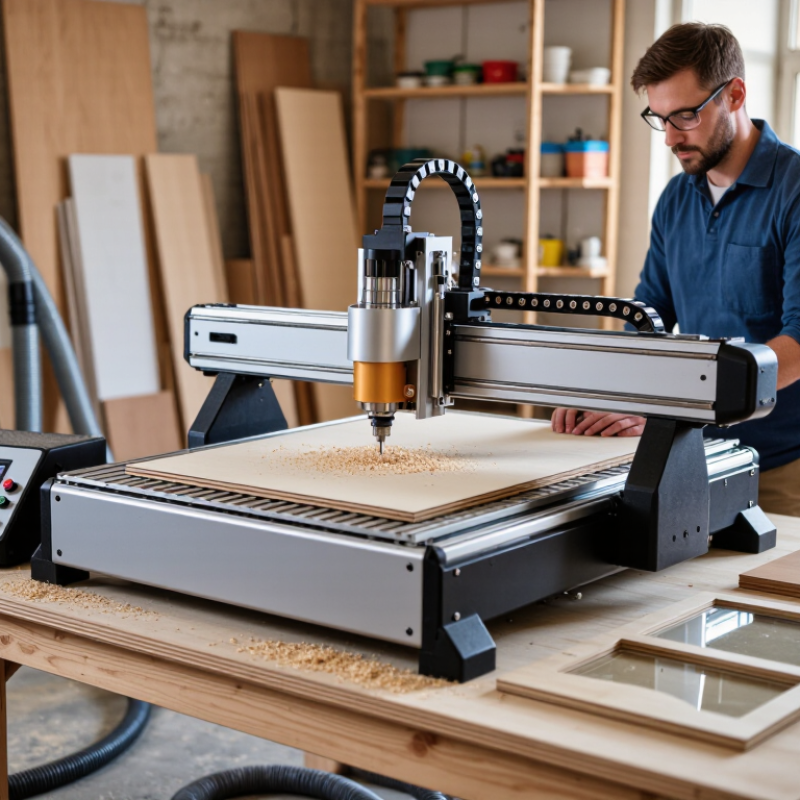
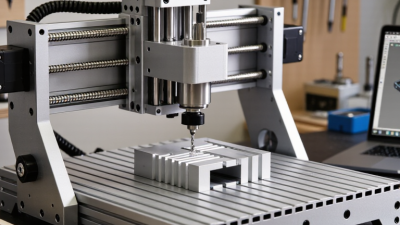
A desktop CNC router is a compact, computer-controlled cutting machine. A spindle moves along a gantry while a small workpiece sits on the bed. The machine follows toolpaths created from a digital design, making repeated cuts with consistent positioning. Small-shop materials often include plywood, hardwood, plastics, and soft metals, depending on the machine’s rigidity and tooling. Check the manufacturer’s stated limits before choosing a material.
In a small shop, this router can produce signs, panels, templates, and fitted parts without needing industrial floor space. It can also help a maker repeat a job after adjusting the design. That matters. Accurate results still depend on practical details: a square frame, secure workholding, sharp cutters, and dust collection. Setup takes time, and small machines may struggle with thick stock or long production runs. Not always a shortcut. From hands-on use, the first test cut often reveals more than a screen preview: grain direction, tool chatter, and dust buildup can all change the finish. A desktop router is useful when its working area and cutting capacity match the shop’s actual jobs, not just its most ambitious plans.
Why Choose a Desktop CNC Router for Your Business? - Define Desktop CNC Routers and Their Role in Small-Shop Production
| Dimension | Desktop CNC Router | Role in Small-Shop Production | Practical Consideration |
|---|---|---|---|
| Definition | A compact, computer-controlled cutting machine that moves a rotating tool across a workpiece along programmed axes. | Turns digital designs into repeatable cuts, pockets, engravings, and profiles. | Work area, rigidity, spindle, and supported software vary by machine. |
| Typical work | Sign panels, small furniture components, templates, decorative parts, and prototype pieces. | Supports custom orders, product development, and short production runs. | Large parts may need to be divided into sections or made on a larger machine. |
| Common materials | Depending on the machine and tooling: wood, plywood, plastics, foam, and some non-ferrous metals. | Enables a shop to make varied parts without relying entirely on hand-cutting. | Material compatibility and cutting depth must be checked; metal work requires suitable rigidity, tooling, and cutting conditions. |
| Repeatability | Follows the same toolpath when the setup, workholding, tool, and material are consistent. | Makes matching parts and repeat orders easier to produce. | Accuracy depends on machine condition, calibration, tool wear, and secure workholding. |
| Setup and workflow | Typically requires a CAD design, CAM toolpath, tool installation, workpiece setup, and a supervised machining cycle. | Connects digital design work with in-house part making. | Operators need training in toolpaths, feeds and speeds, safe operation, and dust control. |
| Space and installation | Designed for a bench or compact shop area, though the machine needs room for loading, maintenance, and dust collection. | Can add CNC capability where floor space is limited. | Allow for electrical requirements, ventilation, noise, chip management, and safe access. |
| Best-fit production | One-off jobs, prototypes, personalized products, and small batches. | Helps small businesses offer more customization and bring selected jobs in-house. | High-volume production may require a larger, faster, or more automated system. |
| Key limitations | Compact travel, limited cutting depth, and lower rigidity than many industrial machines. | Most suitable for appropriately sized parts and workloads within the machine’s capabilities. | Check usable work area, spindle power, rigidity, duty cycle, and service needs before purchase. |
Match Work Area and Spindle Power to Your Parts and Materials
A desktop CNC router should fit the parts you actually make, not just the space available on your bench. Measure the largest panel, its planned hold-down area, and room for clamps before choosing a work area. A nominal 600-by-900-mm bed may leave less usable space once fixtures are installed. A larger bed is not automatically better; it can take up valuable shop space without improving your workflow.
Spindle power matters when cutting dense stock or using larger tools, but it cannot replace sensible feed rates and sharp bits. The USDA Forest Service’s Wood Handbook (FPL-GTR-282) reports specific gravity values of about 0.35 for eastern white pine and 0.63 for sugar maple. That difference is a useful reminder: “wood” is not one uniform cutting material. Match spindle capacity, tool diameter, and pass depth to your hardest regular job, then check the machine’s duty rating. I’d question any plan based on occasional maximum cuts alone.
Tips: Test your thickest intended material with a shallow cut. Watch for spindle strain, chatter, and rough edges. Leave clearance for clamps, and remember that a little extra work area can prevent awkward repositioning later.
Verify Positioning-Accuracy Claims Using ISO 230-2 Tests
A desktop CNC router can save floor space, but its accuracy claim needs evidence. Ask for a positioning test report, not a brochure number. ISO 230-2:2014 defines methods for measuring numerically controlled axis positioning accuracy and repeatability. It does not set one universal pass mark for every desktop router. That distinction matters.
Check the report for results by axis, in micrometres, including bidirectional positioning accuracy and repeatability. Confirm the test positions, approach directions, measurement equipment, and machine conditions are stated. Compare results across repeated measurements, not just the best reading. Small errors matter. A few hundredths of a millimetre can affect hole alignment on a panel. Still, positioning data alone cannot predict every cut: tool runout, cutter deflection, workholding, and material movement also influence the finished part. The test report is useful, not the whole story. Ask whether the figures were measured on the assembled machine under conditions close to your workshop.
Estimate Payback from Cycle Time, Labor, and Scrap-Rate Data
A desktop CNC router can improve throughput, but cycle time alone does not prove that it will pay for itself. Compare the current process with a timed trial on the same part, including setup, loading, cutting, and finishing. Suppose a job takes 12 minutes per part today and seven minutes after routing. Across 300 parts monthly, that creates 25 hours of machine capacity. Useful, but not automatically 25 hours of labor saved. Track hands-on minutes separately.
Scrap matters too. If rejects fall from 4% to 2%, six fewer parts are lost per 300 produced. At $18 in material and finishing cost per part, that is $108 monthly. If hands-on time drops from six minutes to three, the shop recovers 15 labor hours. At $24 per hour, that adds $360, provided staff can use that time productively. Subtract recurring tooling and maintenance costs; at $120 monthly, estimated net benefit is $348. A $4,200 router would then suggest roughly 12 months to pay back. Numbers can mislead. Recheck them with several weeks of production data, and revise the estimate when jobs vary or setup takes longer than expected.
Plan Dust Controls: OSHA PNOR Limits Are 15 mg/m³ Total and 5 mg/m³ Respirable
A desktop CNC router can fit a small workshop, but its compact size does not make dust control optional. OSHA’s PNOR limits are 15 mg/m³ for total dust and 5 mg/m³ for the respirable fraction, measured as 8-hour time-weighted averages. These limits apply to particulates not otherwise regulated; they are not a universal safe target for every material.
Capture dust at the cutter. A close-fitting shroud, properly sized extraction system, and sealed duct connections help keep chips and fine particles out of the breathing zone. Check airflow with the router running, since a system that works on paper may perform poorly with a clogged filter or leaking hose. Small details matter.
Not every visible chip is the main concern. Fine dust can linger near the machine or settle on rails, shelves, and nearby work surfaces. Use suitable cleanup methods rather than dry sweeping or compressed air, which can put settled dust back into the air. A clean bench can still hide exposure. Where exposure is uncertain, arrange appropriate air monitoring and review the material-specific requirements with a qualified safety professional. The PNOR figures alone cannot confirm that a workshop is adequately protected.
Why Choose a Desktop CNC Router for Your Business?
Plan dust controls around applicable OSHA limits for particulates not otherwise regulated (PNOR).
OSHA PNOR permissible exposure limits are 15 mg/m³ for total dust and 5 mg/m³ for the respirable fraction, measured as 8-hour time-weighted averages. These limits are exposure thresholds, not recommended operating targets. Evaluate dust collection and workplace exposure under applicable requirements.
Related Posts
-
Unlocking Creativity: How a CNC Wood Router Transforms Your Woodworking Projects
-
Best CNC Router UK 2026 Which One Should You Buy?
-
7 CNC Router Kit Tips for Choosing the Right Kit
-
How to Choose the Best Desktop CNC Mill?
-
What Is the Best Desktop CNC Machine?
-
Unlocking the Advantages of Table Top CNC Machines for Your Business Success

Siemensstraße 13-15
47608 Geldern
NRW Deutschland
Mail: sale@atmmachinesolutions.com
Head office:
+49 (0) 2831 91021-20
Fax:
+49 (0) 2831 91021-99
SUPPORT and INFO
from 3 p.m. to 6 p.m:
+49 (0) 2831 91021-60
( please ring for a long time )
Monday to Friday
8.00 – 12.30
and 13.00 – 15.00
Visit / collection by appointment only!
➣ Sign up for our newsletter
Benefit from a 20% discount, don’t miss any events and always stay up to date.
To access the actual content, click on the button below. Please note that data will be passed on to third-party providers.
More information